Summary
Company roles are used for the following purpose:
- To control the access that specified users have to designated features and data
Table of Contents
1.Types of Company Roles
2.How to Confirm Your Company Roles on the TradeWaltz Screen
1.Types of Company Roles
There are a total of 8 different company roles.
| Company Roles |
Description |
Competencies in TradeWaltz |
|
Exporter
|
- Roles primarily intended for use by shippers engaged with export businesses
- Assigned the most extensive system privileges in TradeWaltz
|
- Access export-related features
- Create tradings and add relevant processes
- Specify companies in tradings
|
|
Importer
|
- Roles primarily intended for use by consignees engaged with import businesses
- Assigned the most extensive system privileges in TradeWaltz
|
- Access import-related features
- Create tradings and add relevant processes
- Specify companies in tradings
|
Offshore
|
- Roles primarily intended for use by shippers/consignees engaged with offshore businesses
- Assigned the most extensive system privileges in TradeWaltz
|
- Access export- and import-related features
- Create tradings and add relevant processes
- Specify companies in tradings
|
Forwarder
|
- Roles intended for use by forwarders engaged with handling cargo or customs clearance
|
- Access export- and import-related features within the tradings specified by the Exporter, Importer, or Offshore
|
Marine Insurance
|
- Roles intended for use by marine insurance companies
|
- Access the issuance features of marine insurance within the tradings specified by the Exporter, Importer, or Offshore
|
Carrier
|
- Roles intended for use by shipping companies or airlines when issuing B/Ls, etc.
|
- Access the data delivery features for issued B/Ls or AWBs within the tradings specified by the Exporter, Importer, or Offshore
|
Bank
|
- Roles intended for use by banks engaged with final documents or L/C notifications
|
- Access the data delivery features for issued L/Cs within the tradings specified by the Exporter, Importer, or Offshore
|
Commerce And Industry
|
- Roles intended for use by the Chamber of Commerce and Industry engaged with the issuance of non-preferential certificate of origin
|
- Access the issuance features of non-preferential certificate of origin within the tradings specified by the Exporter, Importer, or Offshore
|
In general, a user company is assigned one specific company role.
When a user company takes on the role of a shipper or consignee involved in export or import businesses, it is possible to assign two types of company roles: Exporter and Importer.
2.How to Confirm Your Company Roles on the TradeWaltz Screen
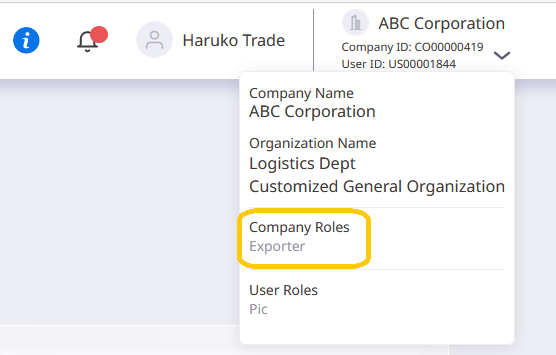
After clicking on your company name or the [V] button displayed in the upper right corner of the TradeWaltz screen, navigate to the [Company Roles] in the dropdown list. This will indicate the specific role assigned to your company.
The screen display below shows the view when the company is designated as the [Exporter].
For more information on the [Company Master], please see below.